Profile · LinkedIn
LinkedIn Profile Optimization: The Bucketing Layer Everyone Skips
Last updated: 3 August 2026
Short answer: LinkedIn profile optimization is the work of making your profile findable by LinkedIn's own search and convincing to the person who lands on it. Most advice only covers the second half. The findable half runs on something quieter: LinkedIn uses machine learning to classify the free-text job title you typed into a standardized title, and that standardized title carries a function and a seniority level. Those derived buckets are what Sales Navigator's Function and Seniority filters actually query. Write a clever title and you can drop out of the buckets entirely — invisible to every buyer and recruiter who filters instead of scrolls.
The 60-second version: put a standard, machine-recognizable title in your experience title field; spend your 220-character headline on searched terms plus proof; list the skills you want to be found for (LinkedIn allows up to 100); repeat your core keyword two or three times across a 2,600-character About section; then measure search appearances, not profile views.
Why does most LinkedIn profile optimization advice only do half the job?
Because it optimizes the page, not the retrieval. Standard guides cover photo, headline, About section, custom URL, and recommendations — every one of which only matters after a human is already looking at you. None of them address the standardized fields that decide whether LinkedIn shows you to that human in the first place.
Look up "how to optimize your LinkedIn profile" and you get a familiar list. Better photo. Better headline. Better summary. Ask for recommendations. It is not wrong. It is the conversion layer.
The gap is that the conversion layer only pays off if you get surfaced. And LinkedIn does not surface people the way a feed surfaces content — it surfaces them through search and through filters, and those two paths read your profile very differently.
A profile can be beautiful, well written, full of personality, and still be structurally invisible.
Recruiters have been saying the profile matters for years without naming the mechanism. "Your LinkedIn profile is your digital brand," Lianne Zhang, a director of talent at Milestone Technologies, told Forbes in 2023 for a piece compiling guidance from over 100 recruiters and hiring managers. True — but a brand nobody retrieves is a brand nobody sees.
So this guide covers three layers, in the order that actually matters:
- The bucketing layer — the standardized categories LinkedIn sorts you into, which decide whether you appear in a filtered search at all.
- The keyword layer — the free text in your headline, skills, and summary that feeds keyword matching.
- The conversion layer — the photo, banner, About section, and Featured section that turn a view into a follow, a reply, or a deal.
Get the order wrong and you polish a page nobody is being shown.
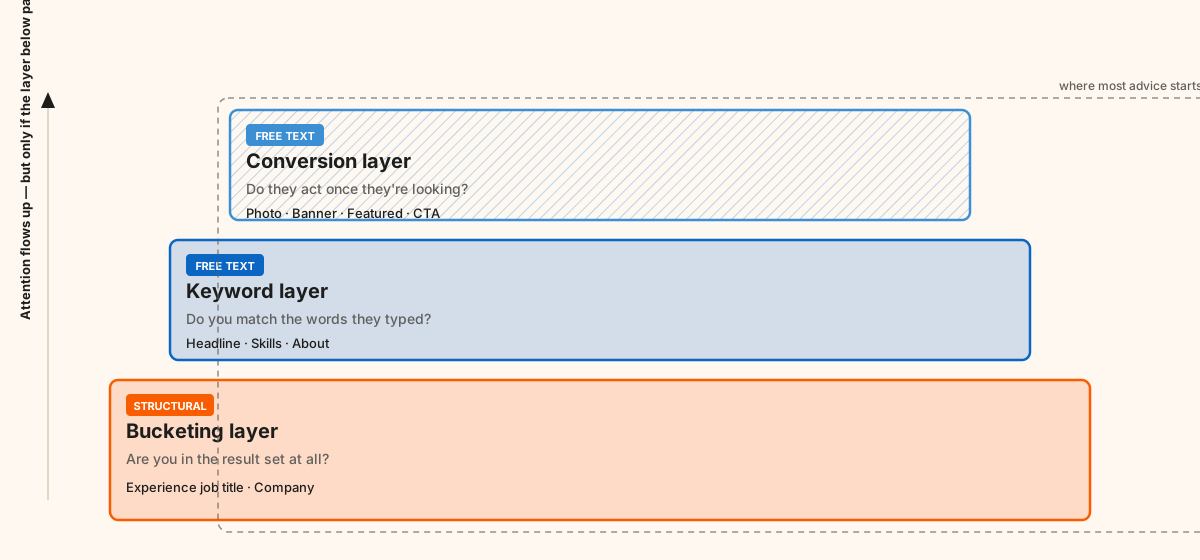
The three layers, in dependency order. Skip the base and the two above it never get exercised.
How does LinkedIn actually decide which bucket you go in?
It classifies you. When you type a title into your experience section, LinkedIn does not just store that string — it runs machine learning over it to map your wording onto a canonical title, and that canonical title carries a function and a seniority level. Those two derived values, not your typed text, are what filtered searches query.
LinkedIn states the mechanism plainly in its own help documentation:
"LinkedIn uses machine learning to classify unique job titles entered by members in their profiles into standardized titles."
Microsoft's developer documentation for LinkedIn's standardized data makes the structure explicit: each position is mapped to a list of titles and their higher granularities, where every standardized title carries a function identifier and a superTitle identifier.
In Sales Navigator, Function and Seniority Level are not fields you complete. They are inferred, per current position, from your titles. Current Job Title matches the text of your experience entries. Only the Keywords filter reads your profile as free text. LinkedIn's persona documentation confirms the shape: personas are defined by function, seniority, job title, and geography — three of those four are derived rather than written.
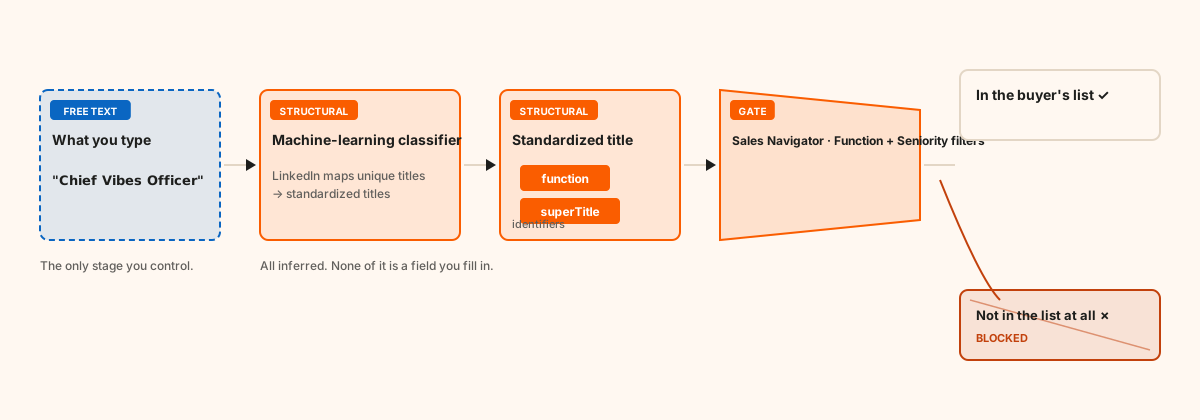
What actually happens to the text you type into your title field.
Which profile field feeds which system?
| Profile field | What reads it | Standardized or free text | What it decides |
|---|---|---|---|
| Experience position title | Function + Seniority inference; Current Title filter | Standardized (ML-classified) | Whether you appear in filtered results at all |
| Headline | Keywords filter; every human who sees you | Free text | Whether you get clicked |
| Skills | Keywords filter | Free text, from LinkedIn's skill taxonomy | Whether you match skill-based searches |
| About / summary | Keywords filter | Free text | Whether a visitor converts |
| Company | Company and account filters | Standardized (company entity) | Account-level targeting |
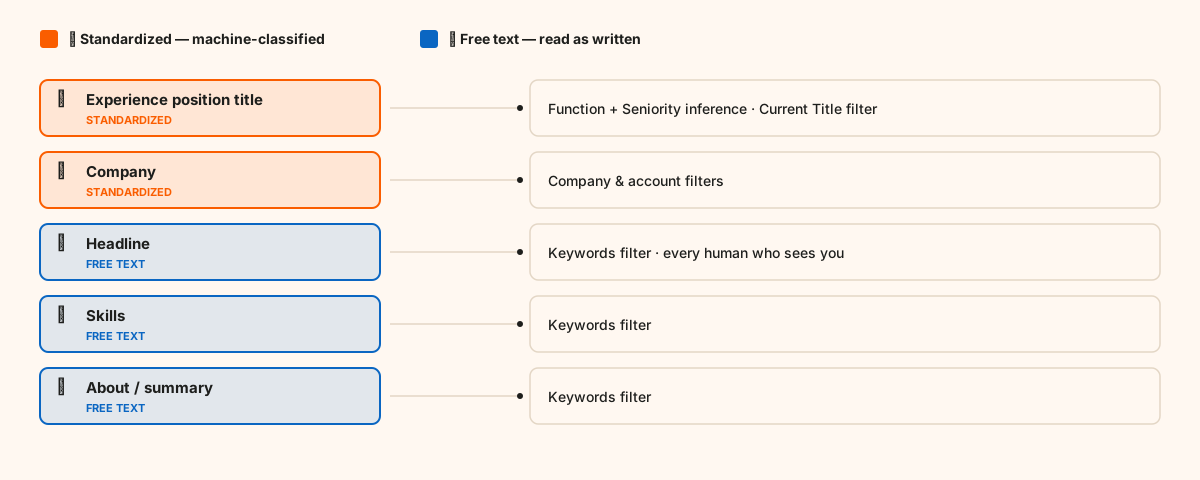
Two of these five fields are machine-classified. The other three are read as plain text.
What goes wrong when the classifier can't map you?
It guesses, and the guess can be badly wrong. Practitioners working in Sales Navigator daily report founders and CEOs being classified at entry-level seniority because their title text gave the classifier nothing standard to hold onto.
Consider what that costs. A buyer builds a list: Function = Marketing, Seniority = CXO, Geography = Benelux. If your title reads "Chief Vibes Officer" or "Growth Ninja" or "I help founders scale to $10M," you are not in that list. Not ranked low in it — absent from it. The filter is a gate, not a ranking.
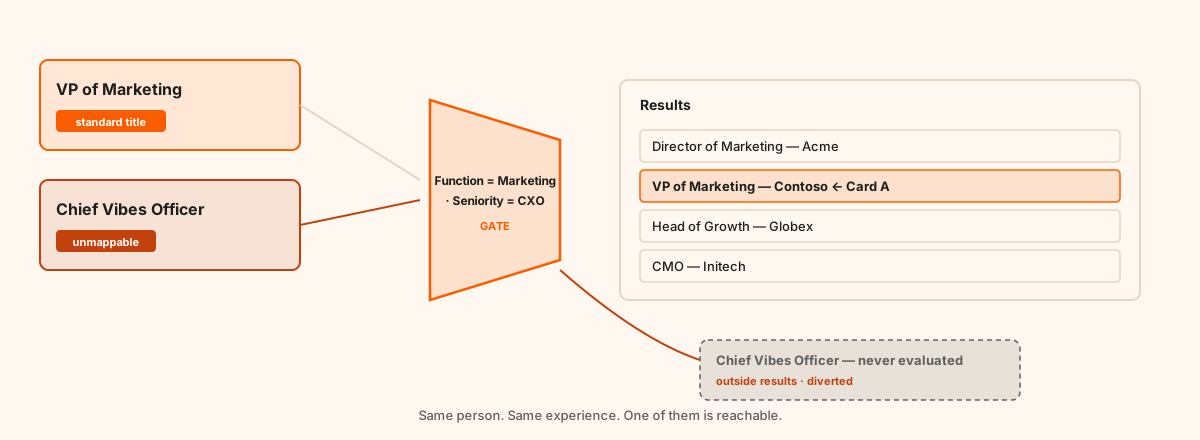
A filter is a gate. You are either inside the result set or you are not in it at all.
LinkedIn even advises members directly to use standardized job titles when possible. Almost nobody does, because most personal-brand advice pushes hard in the opposite direction.
What is documented, and what is just repeated?
Most writing on this topic states everything with equal confidence. It should not. Here is the same material sorted by how well it is actually evidenced:
| Claim | Status |
|---|---|
| LinkedIn maps typed titles onto standardized titles by machine learning | Documented — LinkedIn's own docs |
| Every standardized title carries a function and a superTitle identifier | Documented — Microsoft Learn API reference |
| Sales Navigator Function and Seniority are inferred, not entered | Documented — LinkedIn docs |
| Up to 100 skills per profile | Documented — LinkedIn docs |
| The position title field is what drives the mapping | Strongly implied — the API maps at position level; never stated outright |
| The 220-character and 2,600-character limits | Undocumented — stable practitioner testing, no official page |
| Section weighting inside LinkedIn's ranking | Folklore — LinkedIn has published nothing on it |
| "87% of recruiters use LinkedIn to find candidates" | False as quoted — the 2016 study measured vetting, not sourcing |
If you take one habit from this piece, take that column. Knowing which of your tactics rest on documentation and which rest on repetition is most of what separates a working profile strategy from cargo cult.
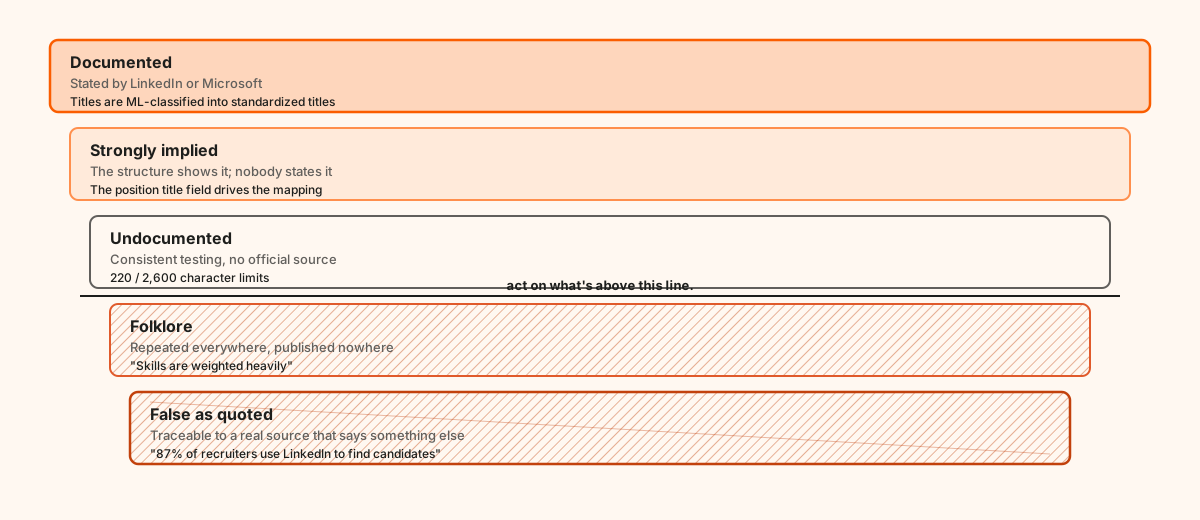
Sort any LinkedIn advice you read onto this ladder before acting on it.
The nuance most advice gets backwards
Be careful here, because this is where a lot of LinkedIn content quietly overclaims — including, probably, something you have read this week.
The available evidence points to your experience position title as the input to standardization. Function and seniority are generated per current position, and Microsoft's API documentation describes the mapping at the level of positions, not headlines. LinkedIn has never publicly confirmed that your headline feeds the standardized title, function, or seniority inference.
What that line demonstrably does is carry free text into keyword search and sit in front of every human who encounters you in a result list, a comment thread, or a connection request.
The correct split:
- Experience job title → the buckets. Keep it standard. This is a structural field, not a creative one.
- Headline → keywords and humans. Positioning, proof, and personal voice belong here.
That distinction is the highest-leverage idea in this guide.
Which five fields decide whether you get found?
In order of structural leverage: your experience title, your headline, your skills, your About section, and your Featured section. The first sets your buckets, the middle three feed keyword search, and the last converts the attention the other four earn.
1. Your position title — the bucket key
Use a title a classifier has seen ten million times. "VP of Marketing." "Head of Sales." "Founder." "Senior Project Manager." If your company uses an internal title nobody outside would recognize, put the standard equivalent in the title field and explain the real remit in the description underneath.
Keep the personality. Just keep it out of this one field.
If you hold several current roles, each generates its own function and seniority. That can work for you — a founder who is also a fractional CMO surfaces in two different filtered searches — or against you, if a minor side role drags your inferred seniority down.
2. Your headline — 220 characters of keyword and positioning
The headline runs to 220 characters, raised from 120 in August 2020 and unchanged since. Only the leading 60 to 70 typically render in search results, comments, and connection requests, so the front of it carries the weight.
Margaret Buj, a senior talent partner at Mixmax, offered Forbes three frameworks for optimizing that line around keyword searches:
"Role | Specific achievement · Role | Years of experience in industry | Fun fact · Role | Helping ___ (type of company) do ___ (result)"
A version that serves both buyers and recruiters:
[Searched title] | [Specialty or ICP] | [Proof or credential]
For example: Head of Marketing | B2B SaaS Demand Gen | Scaled 3 teams past $10M ARR.
Every element there is a term someone types. Compare "Chief Storyteller @ Acme" — warm, memorable, unsearchable.
Optimizing for buyers rather than employers? Swap the credential for the outcome: Fractional CMO | Helping B2B founders build content engines | 40+ launches.
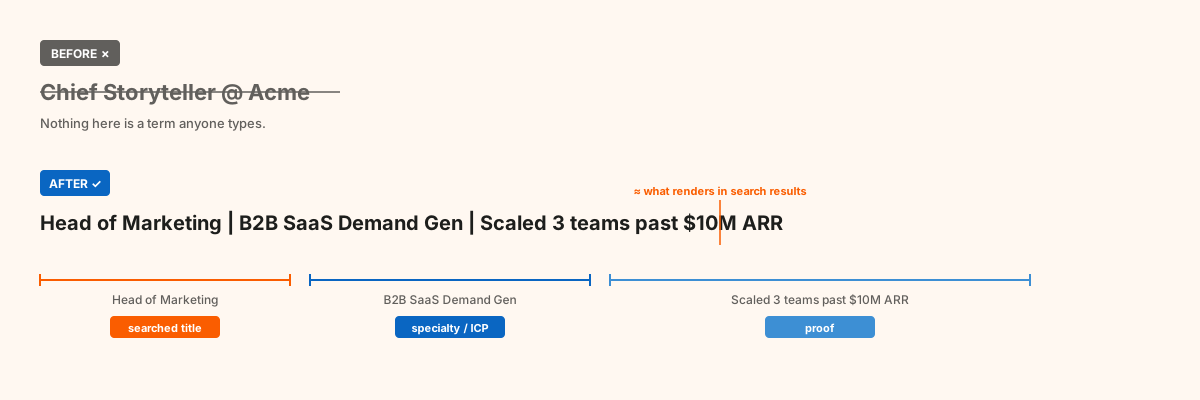
Every element on the right is a term somebody actually types.
3. Your skills — the filter surface
LinkedIn allows up to 100 skills, of which you can pin five as "Top skills" near the top of the page.
Treat this as a search index, not a trophy case. List the exact phrases someone would use to describe the problem you solve.
One honest caveat, because you will see the opposite asserted confidently: LinkedIn has never published anything about how it weights skills relative to other sections. That skills are searched is well established. That they are weighted "heavily" is folklore. List them deliberately because they are a searchable surface and a credibility signal — not because of a weighting rumour.
Prune aggressively. Skills you no longer want work in pull endorsements, and attention, in the wrong direction.
4. Your About section — repeat the keyword without stuffing
The About section holds roughly 2,600 characters, and only the opening lines show before the "see more" fold, so those lines do a job by themselves.
This is the one place where deliberate repetition helps. Your core keyword should appear more than once, naturally, while you describe real work. Not eleven times — two or three, placed where they belong: once in the opening, once where you describe how you solve the problem, once near your proof.
A structure that holds up:
- Hook (2 lines): your strongest concrete result, or a sharp question. This is what shows before the fold.
- Problem (3–4 lines): the specific problem you solve, in your buyer's language.
- Solution (4–5 lines): how you solve it, and what makes the approach different.
- Proof (2–3 lines): numbers — teams led, revenue moved, systems shipped, clients served.
- Call to action: one clear next step.
Numbers beat adjectives. "Experienced marketing leader" is a claim anyone can make. "Scaled content from 4,000 to 90,000 monthly visitors in 11 months" is evidence someone can verify and repeat.
5. Your Featured section — where intent gets captured
Three slots earn their place: a post that performed unusually well, as proof of authority; a case study or client result, as proof of outcome; and a lead magnet, to move the relationship off-platform.
One mechanical detail: when adding a featured link, include a title and an image but leave the description empty. With a description present, clicking the card expands it instead of sending the visitor through to your site.
What does the conversion layer look like in the first five seconds?
Findability earns the visit; the conversion layer decides what happens next. Four elements do almost all the work: a real headshot, a purposeful banner, the follow-primary setting, and a custom URL. Together they take under 20 minutes and they set the frame for everything a visitor reads afterwards.
Photo. A real headshot, good light, plain or gradient background, eye contact, a warm expression. Not a cropped group shot, not a selfie. Avoid the "Open to Work" and "Hiring" frames — they are legible to everyone and set a frame you likely do not want leading your professional brand.
Banner. Custom, clean, doing exactly one job: value proposition, social proof, or a single call to action. The default banner wastes 1584 × 396 pixels at the top of the page.
Follow-primary setting. Under Settings & Privacy → Visibility → Followers, turn on "Make follow primary." Visitors then see Follow as the main button rather than Connect. If you are building an audience, this quietly changes the growth curve, because following is a far lower-commitment action than connecting.
Custom URL. Two minutes of work. It makes the profile shareable and helps search engines index the page — which matters increasingly beyond LinkedIn itself. A Semrush study of AI visibility found LinkedIn to be the second-most cited domain across ChatGPT search, Perplexity, and Google AI Mode, so a well-built profile now earns visibility in AI-generated answers too.
What can you fix in 30 minutes?
Five things, in this order — structural before cosmetic:
- Fix your position title. Standard title in the title field, personality in the description. (5 min)
- Rewrite your headline as searched title, specialty, proof. (10 min)
- Rebuild your skills list. Delete the stale, add the phrases buyers and recruiters use, pin your top five. (5 min)
- Rewrite your About opening so the first two lines carry a real result and your core keyword. (7 min)
- Set follow to primary and fix your URL. (3 min)
Everything else — banner design, Featured curation, recommendations — is worth doing, and none of it will move the needle as much as those five.
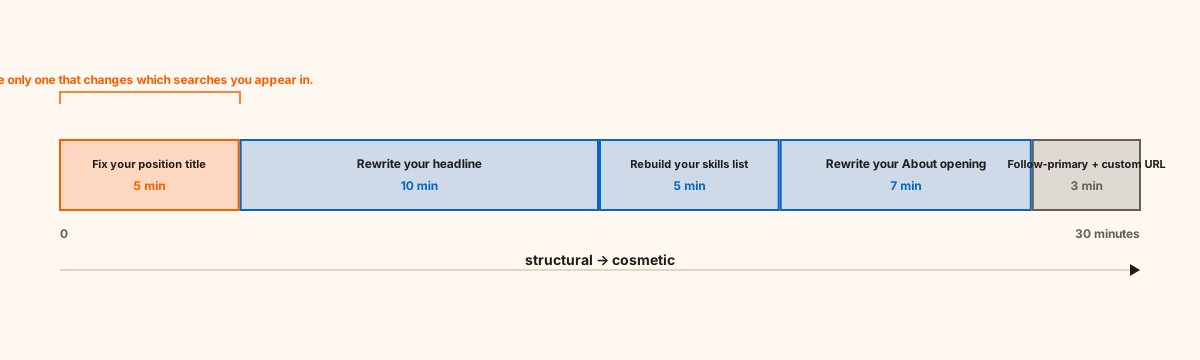
Thirty minutes, spent in the order that compounds.
When does this matter most — and when does it not?
This matters most if your audience finds people by filtering: recruiters using LinkedIn Recruiter, SDRs and founders building lists in Sales Navigator, agencies sourcing partners, anyone whose buyers work from a list rather than a feed.
This matters least if essentially all your inbound comes from content distribution — people who already follow you, or who found you through a post rather than a search. If nobody is filtering for you, a non-standard title costs you little, and the conversion layer is where your time should go. Be honest with yourself about which world you live in; the answer changes the priority order above.
Worth noting on the recruiter side: the widely quoted "87% of recruiters use LinkedIn to find candidates" is a misreading. The Jobvite Recruiter Nation Report figure it comes from is a decade old, from 2016, and found that 87% of recruiters considered LinkedIn most effective when vetting candidates during hiring — not sourcing them. Vetting is still a real job your profile has to survive; it just is not evidence about search behaviour.
How do you tell whether it worked?
Watch search appearances in your profile analytics, not profile views. Search appearances is the direct readout of the findable half: it tells you how often you surfaced in someone's results. Give any change two to four weeks — the classifier does not re-read your profile the moment you hit save.
If search appearances stay flat while you are actively chasing opportunities, your LinkedIn profile is not surfacing to buyers or recruiters at all — and no amount of rewriting your summary will fix a bucketing problem.
You can also pull your Social Selling Index, a free score LinkedIn calculates across four components, one being profile completeness. Treat it as a rough diagnostic rather than a target: it flags obvious gaps, not weak positioning.
For a second opinion on the writing, free profile optimizer tools — Resume Worded, Jobscan, Careerflow — will score your profile and flag missing terms. They are genuinely useful for the keyword layer. As far as I can tell, none of them check the bucketing layer, which is precisely why it stays broken on so many otherwise polished profiles. Fix the buckets yourself and the free tools become useful for everything above them.
Frequently asked questions
What does LinkedIn profile optimization actually mean? It means making your profile easy to find in LinkedIn search and convincing to read once someone arrives. The findable half is structural: standard titles that classify correctly, plus searched terms in your headline, skills, and summary. The readable half is evidence — results with numbers instead of adjectives.
Is my LinkedIn profile just an online resume? No, and treating it like one is the most common mistake. A resume is read by someone who already holds it. A profile has to be retrieved first, by a filter or a search, and retrieval runs on standardized fields a resume does not have. Optimize for retrieval, then for reading.
Should my headline match my job title? No. Your experience title should be standard so the classifier buckets you correctly. That line is where you differentiate, with searched terms plus the outcome you deliver. They do different work and should not be identical.
Will a creative title really hurt me? If your audience finds people by filtering, yes. Function and Seniority are gates, and a title the classifier cannot map risks putting you on the wrong side of one. Keep the creativity in the headline, where it costs nothing.
How many keywords should I repeat? Enough to be unambiguous, not enough to be obvious. Your core phrase two or three times across the About section, once in the headline, and in your skills. Stuffing reads as desperate to humans and does nothing for the filters, which query standardized fields rather than counting term frequency.
Does LinkedIn weight some profile sections more than others in search? Nobody outside LinkedIn knows. Practitioner sources assert it constantly; LinkedIn has published nothing on relative weighting. What is documented is which fields are standardized versus free text — and that distinction is more actionable than any weighting rumour anyway.
How long until it works? Search appearances typically start moving within two to four weeks. Standardization is not instant, and neither is the flywheel of people finding you, viewing you, and engaging with your content.
How was this verified?
Written 3 August 2026. Every mechanical claim above was checked against a primary source rather than a secondary write-up, because this topic is unusually full of confidently repeated folklore.
What that meant in practice: the standardization mechanism was taken from LinkedIn's own documentation and corroborated against Microsoft's public API reference for LinkedIn standardized data, which is the more solid of the two because it shows the actual data structure. The filter behaviour was checked against LinkedIn's persona documentation and against practitioner documentation of the live filter set. Character limits could not be verified against any official page — LinkedIn publishes none — so they are reported as practitioner consensus. The recruiter statistic in circulation was traced back to its 2016 origin and found to describe something different from what it is usually cited for, so it is corrected here rather than repeated.
Claims that could not be verified are labelled in the table above rather than quietly dropped. Next scheduled review: 3 November 2026, or sooner if LinkedIn changes its filter set.
An optimized LinkedIn profile is the foundation, not the whole of it. It is what makes your content, your engagement, and your outbound work harder — because every one of those pushes people back to a profile that now converts, gets found, and turns quiet visits into real opportunities.
Author: Jasper Ruys — founder of Viralz. If you have your own before/after search-appearance numbers from making these changes, add them here; first-hand data is the one thing this article cannot borrow.
Sources: LinkedIn Help — standardized titles · Microsoft Learn — LinkedIn standardized title data · LinkedIn Help — personas · LinkedIn Help — skills limit · LinkedIn Help — standardized titles guidance · Evaboot — Sales Navigator filters · Forbes — 100 recruiters on LinkedIn profiles · Jobvite Recruiter Nation 2016 · Semrush — LinkedIn AI visibility study