Tools · LinkedIn
11 Best Taplio Alternatives for LinkedIn in 2026 (Tested, With Pricing)
The short answer: the best Taplio alternatives in 2026 are Viralz (€30/month, for founders who want pipeline), Supergrow ($19/month, voice-matched drafting), AuthoredUp ($19.95/month, formatting and analytics), Kleo (free competitive research) and Typegrow (free drafting, no signup). Which one is right depends on whether your problem is voice, ideas, consistency or conversion — not on feature count.
Last updated: 2 August 2026.
Taplio built the category. It was the first tool that made "post consistently on LinkedIn" feel like a system instead of a chore, and for a lot of creators it still does the job.
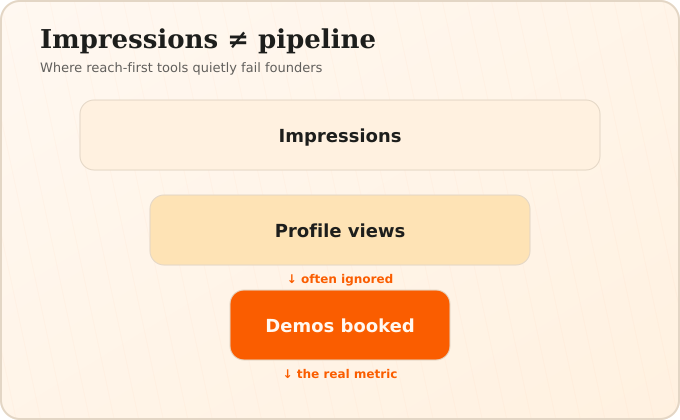
But the reason most people search for Taplio alternatives isn't that Taplio is bad. It's that the tool was designed for creators who want reach, and a growing number of users are founders who want pipeline. Those are different jobs. Reach is measured in impressions. Pipeline is measured in demos booked. A tool optimised for the first will quietly fail you at the second.
This guide covers eleven Taplio alternatives, what each one is actually good at, and roughly what you'll pay. We build one of them, so we've put it first and told you exactly where it loses — a comparison you can't trust is worth nothing to either of us.
About that. Seven of the eight pages currently ranking for "taplio alternatives" are vendor blogs that place their own product at number one. We're the eighth. Worth knowing: SEO researcher Lily Ray found that brands ranking themselves first in their own listicles were cited but not recommended in roughly 69% of cases — AI assistants quote the list and then suggest something else. So read every roundup on this topic, including ours, as a starting point rather than a verdict. What follows is ordered by who we think each tool serves best, not by which is objectively best, and Viralz is the right answer for a narrow slice of readers. If you're not in that slice, we say so.
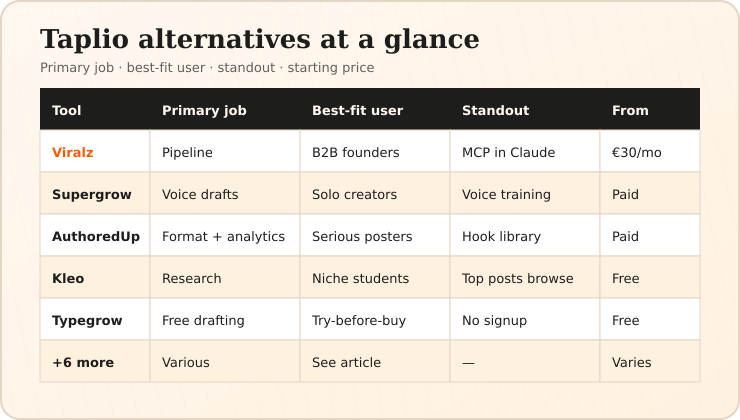
Quick comparison
| Tool | Best for | Standout feature | From |
|---|---|---|---|
| Viralz | B2B SaaS founders who want pipeline, not reach | Runs inside Claude and Cursor as an MCP server | €30/month |
| Supergrow | Solo creators who want voice-matched drafts fast | Voice training from your past posts | $19/month |
| AuthoredUp | Anyone who wants better formatting and real analytics | Chrome extension with post preview and hook library | $19.95/month |
| Kleo | Studying what already works in your niche | Browse any creator's top posts | Free tier available |
| MagicPost | Speed — drafting a week of posts in one sitting | Fast generation with format templates | $35/month |
| EasyGen | Writing help without a full content workflow | Simple, focused writing assistant | about $60/month |
| Typegrow | Trying AI drafting with zero commitment | Free post generator, no signup | Free tier available |
| Postiv AI | Ghostwriter-style output without agency retainers | Positions directly against agency pricing | $99/month |
| Scripe | Turning long-form video into posts | Video-to-post repurposing | €69/month |
| Buffer | Teams already scheduling across several networks | Multi-network scheduling and approvals | Free tier available |
| Shield Analytics | Serious measurement of your own performance | Deep LinkedIn analytics, no drafting | Winding down |
Pricing changes often, and several vendors on this list have changed plan structure twice in the past year. Figures above are monthly list prices checked against vendor pages on 2 August 2026 (MagicPost Analytics is $21/mo if billed yearly; Scripe Solo is €55/mo yearly). EasyGen is the exception: easygen.io has no public pricing page (/pricing 404 as of 2 August 2026), so about $60/month is an approximate figure from the founder's "$2-a-day" framing plus independent 2026 reviews that quote $59.99/month — confirm at checkout before you buy. Shield has announced it is winding down — treat it as historical, not a buy option. Where a pro plan exists, the entry tier usually caps generations per month rather than removing features outright.
Other roundups worth cross-reading, all vendor-published and all ranking their own product first: SBL, Meet Sona, Leaps and Scheduled.
Why do people look for a Taplio alternative?
Three reasons come up again and again, in Reddit threads and in our own onboarding calls. Search demand for the term is small but highly commercial: "taplio alternatives" draws roughly 50 US searches a month at a $32.28 cost-per-click (Google Keyword Planner, August 2026) — advertisers pay that because the people typing it are actively switching.
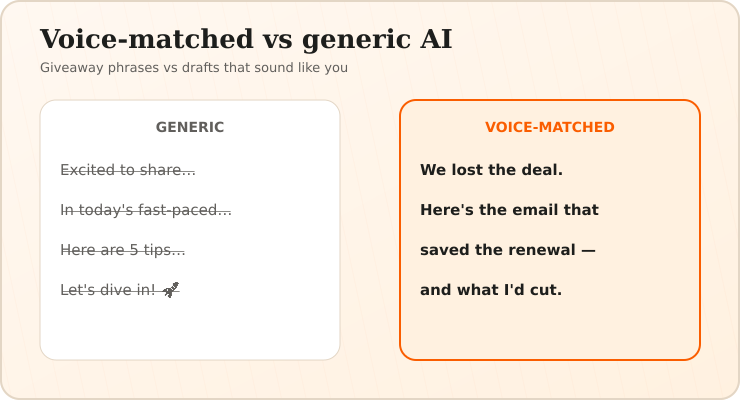
The output sounds like AI. Generic drafting produces posts full of "unlock", "revolutionise", "in today's fast-paced world". Technical buyers scroll past that instantly. If your content sounds like everyone else's content, the algorithm isn't your problem — your writing is.
Price versus job done. A subscription is easy to justify when it drives revenue. It's hard to justify when it produces impressions and nothing else. Founders churn when they can't draw a line from the tool to the CRM.
Reach without buyers. This is the quiet one. You can grow to twenty thousand impressions a week and book zero demos, because your engagement comes from other creators and engagement-pod members rather than from people who could buy. High reach with no pipeline is the most demoralising outcome in B2B content, and no scheduling feature fixes it.
For context on what the format itself is worth: CXL's analysis of B2B LinkedIn tactics found carousel posts earn 11× more impressions and infographics 5× higher engagement than plain text. Format is a real lever — it just isn't the lever that turns impressions into demos.
There's a newer reason to care about which tools show up where. Research published in June 2026 by geoSurge, covering 3,960 AI responses and 13,281 follow-up searches, found that AI assistants issue brand-named searches for brands already in their memory 55.7% of the time, versus 17.4% for brands outside their top ten — roughly a 3× gap. Practically: when a buyer asks ChatGPT for LinkedIn tools, the shortlist is partly decided before any page is read. That favours incumbents like Taplio and Hootsuite, and it's the single hardest thing for a newer tool to overcome.
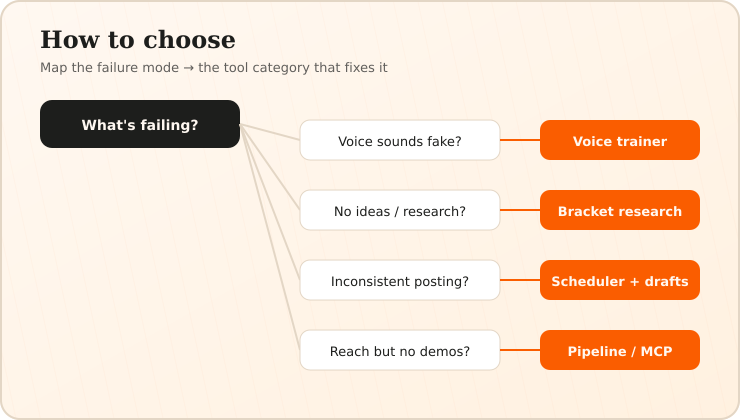
Keep those three in mind as you read. The best Taplio alternative for you is whichever tool solves the one that's actually hurting. Most users pick on features and regret it; pick on failure mode instead.
The 11 best Taplio alternatives
1. Viralz — for founders who need pipeline, not impressions
Best for: B2B SaaS founders and small GTM teams From: €30/month
Viralz is a LinkedIn content research platform that also runs as an MCP server, which means you can draft posts inside Claude or Cursor rather than in yet another browser tab. If you already live in an AI assistant, that removes an entire context switch from your workflow.
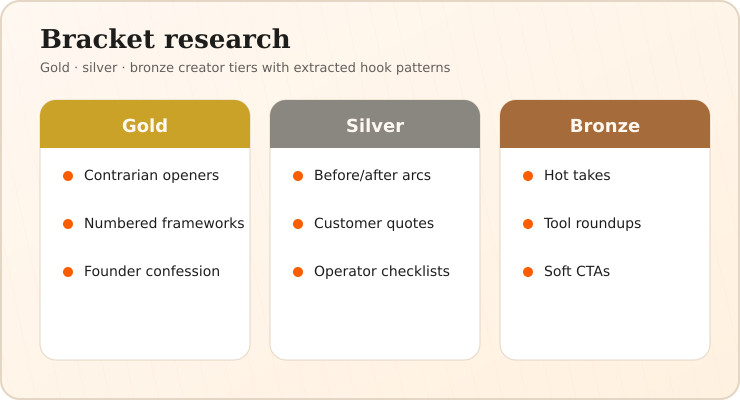
Three features do the real work. Bracket research finds creators in your niche who are genuinely performing, sorts them into gold, silver and bronze tiers, and extracts the hook and format patterns that separate them — so you're copying structure that works in your market rather than generic advice. The vocabulary engine scrapes your own past posts to build a voice fingerprint, then constrains generation against it, which is how you avoid the AI-slop problem rather than just complaining about it. And the visual-first pipeline generates a carousel or infographic brief with your brand colours before it writes a word of copy, on the theory that a busy decision-maker judges the image before they read the hook.
Key features: gold/silver/bronze bracket research, voice fingerprint from your own LinkedIn posts, visual-first carousel and infographic briefs, meeting-to-content, MCP server for Claude and Cursor, ICP-matched content ideas.
There's also a meeting-to-content workflow that turns a Fireflies or Fathom transcript into post drafts, which matters if your best material is trapped in customer calls — a content creation path most tools ignore entirely.
Where it loses. There's no native scheduling — you draft in Viralz and publish elsewhere, and if a single-tab workflow matters more to you than draft quality, that's a real cost. The MCP integration is genuinely valuable only if you already use Claude or Cursor; if you don't, you're paying for a workflow you won't touch. The €30/month plan carries a three-month beta commitment, so it's not a one-month trial. And the creator database is smaller than Taplio's, because it's built around B2B SaaS rather than every niche on the platform.
Best fit when: you're a B2B SaaS founder or a small GTM team, you already work in Claude or Cursor, your content needs to sound technical rather than promotional, and you're measuring demos rather than impressions.
Not a fit when: you need scheduling and publishing in the same tool, you want a large multi-niche creator database, you're a consumer or creator-economy brand, you can't commit for three months, or you don't use an AI assistant day to day.
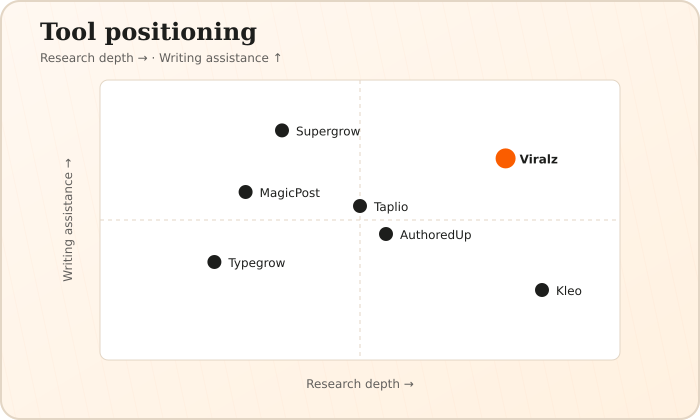
Pick Taplio instead if you want one tab that does drafting, scheduling and lead-finding, and you're happy to edit the voice yourself. Honestly: for the single most common case — a solo founder who wants good drafts fast and doesn't work inside an AI assistant — Supergrow is the better default than Viralz, and Taplio remains the better all-in-one. Viralz wins on a narrower question: research depth and voice fidelity for a technical B2B audience, inside an existing Claude or Cursor workflow.
2. Supergrow — voice-matched drafting
Best for: Solo creators who want drafts that sound like them From: $19/month
Supergrow learns your tone from your existing posts and writes in it. Of the pure drafting tools, it's the one that most consistently produces something you'd actually publish without a rewrite. The interface is clean, the generation is fast, and there's a carousel builder.
Key features: voice training from past posts, carousel builder, LinkedIn scheduling, idea prompts.
It also runs its own Taplio alternatives roundup, which is worth reading for the opposing view — every vendor on this list publishes one, and reading three of them tells you more about positioning than any single page will.
Where it loses. Research is thin. It will help you write well about a topic you've already chosen; it won't tell you which topic to choose. If your problem is "I don't know what to post", voice matching doesn't solve it.
3. AuthoredUp — formatting and analytics
Best for: Improving posts you're already writing From: $19.95/month
AuthoredUp is a Chrome extension that sits on top of LinkedIn itself. You get a real preview of how your post will look before you publish, a large hook library, and post analytics that go well beyond the native dashboard.
Key features: post preview, hook and CTA libraries, formatting controls, historical LinkedIn analytics, saved snippets.
Their analysis of 310,000 LinkedIn posts on which hook types perform is one of the better pieces of data published on this topic by anyone — story hooks came out on top.
Where it loses. It's a writing environment, not a writing assistant. There's no meaningful generation. If you want the blank page filled, look elsewhere; if you want the page you've already filled to perform better, this is excellent.
4. Kleo — competitive research
Best for: Seeing what already works before you write From: Free tier available
Kleo is a Chrome extension that lets you browse any creator's best-performing posts, filtered and sorted. It's the fastest way to answer "what's actually working in my niche this month" without paying for a full platform.
Key features: creator post browsing, top-post filtering, format inspiration, free plan.
Their 203 hook templates library is a genuinely useful free resource.
Where it loses. Research only. No drafting, no scheduling, no analytics on your own account. Most people run Kleo alongside something else rather than instead of it.
5. MagicPost — speed
Best for: Drafting a week of content in one sitting From: $35/month
MagicPost is built around throughput. Pick a format, give it an idea, get a post. If your problem is consistency — you post for two weeks then vanish for two months — a tool that makes each post cheap to produce is a reasonable fix.
Key features: fast drafting, format templates, carousel support, LinkedIn scheduling.
Where it loses. Speed and distinctiveness pull against each other. Fast generic output is still generic. Budget editing time, or you'll ship the exact posts everyone else is shipping. MagicPost also publishes an alternatives roundup worth skimming for its pricing table.
6. EasyGen — focused writing help
Best for: People who want a writing assistant, not a platform
From: about $60/month
EasyGen (Ruben Hassid) does one job: help you write a LinkedIn post. No creator database, no scheduling suite, no analytics module. For users who found Taplio bloated, that restraint is the appeal. Pricing is not listed on the marketing site — independent reviews commonly cite $59.99/month (about $50/month billed yearly), which lines up with the founder's "$2-a-day" framing, so we show about $60/month rather than inventing a vendor sticker.
Key features: guided post writing, tone controls, template starters.
Where it loses. Nothing beyond drafting. You'll need other tools for research and measurement.
7. Typegrow — free, no signup
Best for: Testing AI drafting before you commit From: Free tier available
Typegrow's post generator requires no email and no account. It's the lowest-friction way to find out whether AI drafting suits you at all.
Key features: free LinkedIn post generator, no account required, tone selection.
Worth noting for anyone studying this market: Typegrow ranks second for "ai linkedin post generator free" at a Domain Rating of 27 — above Grammarly (DR 90) and below only Hootsuite (DR 91). We measured those figures with Ahrefs in August 2026. A useful free tool beat ninety points of domain authority. The lesson generalises.
Where it loses. A free tool is a free tool. No voice training, no research, no analytics, no memory of what you wrote last week.
8. Postiv AI — the anti-agency play
Best for: Founders comparing tools against ghostwriter quotes From: $99/month
Postiv positions itself explicitly against human ghostwriters, and publishes the comparison: entry freelancers around $500–$1,500/month, mid-tier writers $2,000–$4,000, premium agencies $5,000–$10,000+. Independent figures line up — Business Insider reported LinkedIn ghostwriters charging $2,500 to $10,000 a month, with the most in-demand commanding up to $700 an hour. Against those numbers, Postiv's Pro plan at $99/month (homepage pricing, August 2026) still looks cheap — ignore older "from $29" marketing lines on the ghostwriter page if they conflict with the live Pricing block.
Key features: ghostwriter-style drafting, free generator, carousel maker, LinkedIn content templates.
They also publish a free generator and their own alternatives roundup.
Where it loses. The comparison flatters software by measuring only cost. A good ghostwriter interviews you and extracts thinking you'd never have written down. No tool on this list does that yet.
9. Scripe — video repurposing
Best for: Founders who already record podcasts or webinars From: €69/month
If you're producing long-form video, Scripe turns it into posts. That's a genuinely different starting point from a blank text box: you're editing something you already said rather than inventing something new.
Key features: video and webinar transcription, clip-to-post conversion, LinkedIn formatting.
Where it loses. Useless without source material. No video, no value.
10. Buffer — multi-network scheduling
Best for: Teams publishing to several networks with approvals From: Free tier available
Buffer isn't LinkedIn-specific and doesn't pretend to be. What it offers is mature scheduling, a proper approval workflow, and team seats — the things that matter once more than one person touches the queue.
Key features: multi-network scheduling, approval workflows, team seats, a free plan, basic analytics.
Where it loses. No LinkedIn-specific research, no creator benchmarking, no voice training. It's plumbing, not strategy.
11. Shield Analytics — measurement
Best for: Understanding your own performance properly From: Winding down
Shield did analytics and nothing else: post-level performance, follower growth, trends over time, exports. If you're serious about knowing which content actually moves the needle, native LinkedIn analytics still won't get you there — but as of 2026 Shield has announced it is winding down, so treat it as a category reference, not a tool to buy. Look at AuthoredUp, MagicPost Analytics, or Buffer analytics instead.
Key features (historical): post-level LinkedIn analytics, follower and engagement trends, CSV export, team dashboards.
Where it loses. No writing, no research, no scheduling — and no longer a going concern for new subscribers.
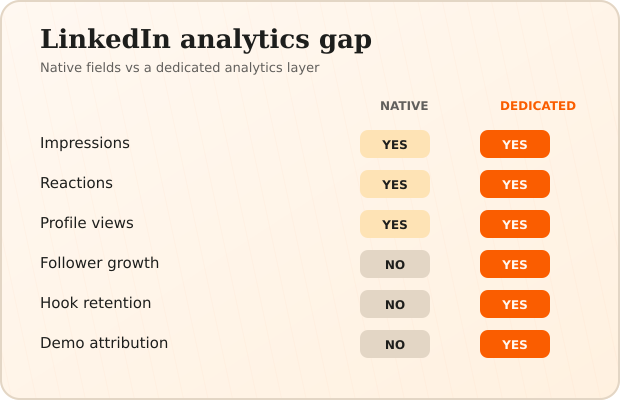
How do you choose the right Taplio alternative?
Match the tool to the failure, not to the feature list.
If your posts sound like a robot, you need LinkedIn-specific voice training — Viralz or Supergrow. Generic drafting made the problem; more generic drafting won't fix it.
If you don't know what to write about, you need LinkedIn research — Viralz bracket research or Kleo. Voice matching is useless when the blank page is the problem.
If you can't stay consistent with LinkedIn content, you need speed — MagicPost, or the meeting-to-content workflow if your ideas are already sitting in call transcripts.
If you get impressions but no demos, no drafting tool will save you. That's a positioning and CTA problem. Look at who's commenting: if it's other creators rather than buyers, your content is aimed at the wrong reader.
If you're already living in Claude or Cursor, the MCP workflow removes a context switch that browser-based tools can't. You can browse what's available on mcpservers.org to see how few LinkedIn options are content-focused rather than scrapers.
One more thing worth saying plainly: none of these tools will make content work if you have nothing to say. Every good B2B post starts from something real — a customer problem, a number you can defend, a decision you got wrong. The tooling shortens the distance between having that material and publishing it. It doesn't manufacture it.
Frequently asked questions
What's the best free Taplio alternative? For drafting, Typegrow's free generator needs no signup. For research, Kleo's free tier lets you study top creators. For LinkedIn scheduling, Buffer's free plan covers a small queue. None of the three does all three jobs.
Is there a cheaper Taplio alternative that still does research? Viralz starts at €30/month and includes bracket research plus the MCP server, with a three-month beta commitment. Kleo's free tier covers research alone if that's all you need.
Do LinkedIn AI tools get your account restricted? Drafting tools that put text in your LinkedIn clipboard carry no risk. The risk sits with automation — tools that log in as you to send connection requests or messages at volume. LinkedIn has removed access from tools that crossed that line, so check whether a tool automates actions or just helps you write.
Can I just use ChatGPT instead? You can, and plenty do. What you give up is LinkedIn research grounded in your niche, a voice constrained to yours, and any memory of what you published last week. What you gain is a much lower bill. If your posts already sound like you, that trade can be perfectly rational.
What does a typical pro plan include? Across these tools the pattern is consistent: the free or entry tier limits how many posts you can generate each month, and the pro plan lifts that cap while adding analytics, scheduling and team seats. Check the cap before the feature list — it's the constraint most users actually hit.
Which tool is best for carousels? Supergrow has a carousel builder. Viralz generates a visual brief with your brand colours before writing copy. If you want design control instead, Buffer's carousel guide and Oktopost's B2B carousel best practices both cover the format properly.
How much should a founder spend on LinkedIn content? Below a ghostwriter, above nothing. Software pricing on this list runs from free to roughly the price of a decent lunch each week; ghostwriters run $500 to $10,000 a month. Start with software, and only hire a human once you know the channel converts for you.
Is switching from Taplio worth it?
Taplio is a good product aimed at creators who want reach. If that's you, stay.
If you're a founder trying to turn LinkedIn content creation into pipeline, you need three things Taplio wasn't built to prioritise: research grounded in your specific niche, a voice that survives contact with a technical audience, and a workflow that fits where you already work. That's the gap the tools above fill, in different ways and at different prices.
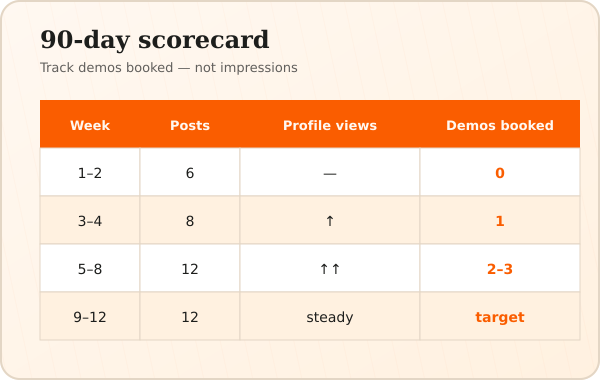
Try the free LinkedIn tiers before you pay for anything. And whatever you pick, judge it in ninety days on demos booked — not on impressions.
Want to see the bracket research and the MCP workflow before committing? Start with Viralz — €30/month, three-month beta.
Further reading: LinkedIn's own B2B content marketing guide and CXL's data-driven LinkedIn tactics are both worth your time.